Showing posts with label Widgets. Show all posts

How to add a Floating Sticky Footer Bar in Blogger

I have seen that a significant number of those utilizing toolbars, for example, Wibiya have needed to remove it because of interfering with the execution of a few scripts like Scriptaculous and Prototype, while others have decided to remove these scripts just to continue utilizing the toolbar.


All things considered, for those who want to have a custom toolbar that does not give them such issues and permit them to keep utilizing different scripts, here how to make our own floating toolbar with a close option.


Adding a custom Sticky Toolbar on Blogger


Step # 1: Login to your accoutn and go to Template > Edit HTML


Step # 2: Now, click inside the code area and Click CTRL + F key and open search box

Step # 3: copy the following code and paste in the search box and find it.

]]></b:skin>
Step # 4: Now above ]]></b:skin> add the following code
 #custom-toolbar {
overflow: auto;
position: fixed;
background: #1B1B1B url("https://blogger.googleusercontent.com/img/b/R29vZ2xl/AVvXsEih2pW9A4LoWKog0izCNEBLYaCVPM43o_G8DHmDJ-NIGs-_E8YjhyV5rpS26udE0Qp1gg7gJ8ZxRfwtNJdCH_T7lGHcE8cuKVWaoLkZkFcdNvXCPl5T4CLcEzT7IoN0N814sQ-VLWQ_ZqM5/s1600/pagelist.png") repeat-x scroll 0 bottom;
font: bold 13px/17px "Helvetica Neue",Helvetica,Arial,Geneva,sans-serif;
height: 33px;
margin: 0 auto;
width: 100%;
bottom:0px;
right:0;
}
.close-toolbar {
float: right;
margin-top:6px;
padding-right: 10px;
cursor: pointer;
}
.search-text {
color: #D1D1D1;
text-align: center;
border-radius: 10px;
}
.google_translate:hover img {
filter:alpha(opacity=0.90);
-moz-opacity: 0.90;
opacity: 0.90;
border:0;
}

Step # 5: Now find out this tag
</head>
Step # 6: Now above the </head> tag add this code
<script type='text/javascript'>
// Custom Toolbar for Blogger (helplogger.blogspot.com)
//<![CDATA[
var toolbar_blogger = new Array();
var toolbar_clear = new Array();
function toolbarFloat(toolb) {
toolbar_blogger[toolbar_blogger.length] = this;
var ftrpointer = eval(toolbar_blogger.length-1);
this.pagetop = 0;
this.cmode = (document.compatMode && document.compatMode!="BackCompat") ? document.documentElement : document.body;
this.toolbsrc = document.all? document.all[toolb] : document.getElementById(toolb);
this.toolbsrc.height = this.toolbsrc.offsetHeight;
this.toolbheight = this.cmode.clientHeight;
this.toolboffset = toolbGetOffsetY(toolbar_blogger[toolbpointer]);
var toolbbar = 'toolbar_clear['+toolbpointer+'] = setInterval("toolbarFloatInit(toolbar_blogger['+toolbpointer+'])",1);';
toolbbar = toolbbar;
eval(toolbbar);
}
function toolbGetOffsetY(toolb) {
var toolbTotOffset = parseInt(toolb.mtasrc.offsetTop);
var parentOffset = toolb.toolbsrc.offsetParent;
while ( parentOffset != null ) {
toolbTotOffset += parentOffset.offsetTop;
parentOffset = parentOffset.offsetParent;
}
return toolbTotOffset;
}
function toolbarFloatInit(toolb) {
toolb.pagetop = toolb.cmode.scrollTop;
toolb.toolbsrc.style.top = toolb.pagetop - toolb.mtaoffset + "px";
}
function closeTopAds() {
document.getElementById("custom-toolbar").style.visibility = "hidden";
}
//]]>
</script>
Step # 7: Now find out for the </body> tag and just above it, add this HTML code
<div id='custom-toolbar'>
<img border='0' class='close-toolbar' onClick='closeTopAds();return false;' src='https://blogger.googleusercontent.com/img/b/R29vZ2xl/AVvXsEjhXJBfvG30FA8I_v5BD-DC0evouYieeTDNnvtTMXjLJblCn9AqDnlboZWnQ-oQsGJn5_XXVtEefI9q_BJTDkI1lB1KJapjll1YHTLYkfpw0U-QFSVi1bjhOfxJNOVrbF2nmTpCcymHt_Fn/s1600/close_button.png' title='Close' width='17'/>
<table border='0' cellpadding='2'>
<tr>
<td style='padding-left:30px; padding-right:50px;'><form action='/search' id='search' method='get' name='searchForm' style='display:inline;'>
<input class='search-text' name='q' onblur='if (this.value == &quot;&quot;) this.value = &quot;Search here...&quot;;' onfocus='if (this.value == &quot;Search here...&quot;) this.value = &quot;&quot;;' size='28' type='text' value='Search here...'/></form></td>
<td style='padding-left:20px;'><a href='http://www.facebook.com/username' title='Follow on Facebook'><img src='https://blogger.googleusercontent.com/img/b/R29vZ2xl/AVvXsEjy1Y5wL-Wf6V0Mc0zE0ksMpchn7VgwspTPl23SP-I5xSpVsU5a4_drxiAdhRB0GJwq3bO6RTDUKsgRVs64A6_ZE5O9mHe1iZ6XS7TxBH0SqL4OE23zTqm-EtQSkL6hpZKPKv6MKBxTr0iK/s1600/facebook-icon.png'/></a></td>
<td><a href='http://twitter.com/username' title='Follow on Twitter'><img src='https://blogger.googleusercontent.com/img/b/R29vZ2xl/AVvXsEhDsOxE7h8_GrjTJRiEZ56ldHJefoUcfZLOL3bnNnN2F2kGPMvymvRbhJzaJIDmX-75lqDQI_RC34AD8Aronu46bquhteKFJy1jQK-ubCxcK2RBI_utC4pW2dtLHip8K6uyKBY3CN4HNn8L/s1600/twitter-icon.png'/></a></td>
<td><a expr:href='data:blog.homepageUrl + &quot;feeds/posts/default&quot;' title='Subscribe to Feed'><img src='https://blogger.googleusercontent.com/img/b/R29vZ2xl/AVvXsEgTY4ORHTBOuGhTQvdLZ2Snu-qfKTsqgf1fPnx3uVMD80G1wLzV4WmrpZEB0GQKdsCoxgCLzX9ucxbj126tQjT8ReMuCzDB8SsPaQ7-YUPBm9K2RTIDbrvoRZfFGj3QXJPtZ70I8p4WhEtV/s1600/rss-feed-icon2.png'/></a></td>
<td style='padding-left:40px; padding-top: 5px;'><a class='twitter-share-button' data-count='horizontal' data-lang='en' href='http://twitter.com/share' title='Publish on Twitter'>Tweet</a><script src='http://platform.twitter.com/widgets.js' type='text/javascript'/></td>
<td><a href='http://www.facebook.com/sharer.php' name='fb_share' title='Publish on Facebook' type='button_count'>Share</a><script src='http://static.ak.fbcdn.net/connect.php/js/FB.Share' type='text/javascript'/></td>
  <td style='padding-left:60px;'><a class="google_translate" href='Javascript:void(0)' onclick='window.open(&quot;http://www.google.com/translate?u=&quot;+encodeURIComponent(location.href)+&quot;&amp;langpair=auto%7Cen&amp;hl=en&amp;ie=UTF8&quot;); return false;' rel='nofollow' title='English'><img align='absbottom' alt='English' border='0' height='24' src='https://blogger.googleusercontent.com/img/b/R29vZ2xl/AVvXsEhY6VuOvNPktnLu9YuKF8_IariYLUs8zyC4vA2I5XxpyYRsN2M4dt9gaTgggspOXg1YHLy7X9lOdwKp4_fMq6nmRkVYByqxpOK23tBUZC2KZpRo1_WA5_IXuBqpH5FZZ81yW5pJrZBKofLr/s1600/United+Kingdom(Great+Britain).png' width='24'/></a></td>
<td><a class="google_translate" href='Javascript:void(0)' onclick="window.open(&quot;http://www.google.com/translate?u=&quot;+encodeURIComponent(location.href)+&quot;&amp;langpair=auto%7Cde&amp;hl=en&amp;ie=UTF8&quot;); return false;"><img alt="German" border="0" align="absbottom" title="German" height="24" src="https://blogger.googleusercontent.com/img/b/R29vZ2xl/AVvXsEhcseFpoKY-whDeaO1pf5gqoTKbwzHYY1uc1fmYB7LkVglLfHsfPe0yOtqY-wZQ91jWwF5Rq-9fSYV95BJXAo4Uf1QtmOGXD7uK7iKAvYtgzHPek80S7HyGYzADxR5TaHsudXZ86LeNod_M/s1600/Germany.png" width="24"/></a></td>
<td><a class="google_translate" href='Javascript:void(0)' onclick='window.open(&quot;http://www.google.com/translate?u=&quot;+encodeURIComponent(location.href)+&quot;&amp;langpair=auto%7Cfr&amp;hl=en&amp;ie=UTF8&quot;); return false;' rel='nofollow' title='French'><img align='absbottom' alt='French' border='0' height='24' src='https://blogger.googleusercontent.com/img/b/R29vZ2xl/AVvXsEjkyhuylXnsr5wq_5xIiAzZaSmgvGD4oqwgg2apL4Ze95YHt419wPwqJOQLlu2Q9VLS5fwoy6rDUt3a6VxMokQC9QXKoKbHAGXGmF9ct-y8rCbi75uqHrHUqpS0tJyVFDzGc5pN3uQKEJEO/s1600/France.png' width='24'/></a></td>
<td><a class="google_translate" href='Javascript:void(0)' onclick='window.open(&quot;http://www.google.com/translate?u=&quot;+encodeURIComponent(location.href)+&quot;&amp;langpair=auto%7Car&amp;hl=en&amp;ie=UTF8&quot;); return false;' rel='nofollow' title='Arabic'><img align='absbottom' alt='Arabic' border='0' height='24' src='https://blogger.googleusercontent.com/img/b/R29vZ2xl/AVvXsEhpbA4R7RPoXcc1Tu9H3lpcL53x0KlbkZwHa9NuwUsx5wnqBm-F8oWWdbit656iiMA_aw066ufe8MG1ctFaxGYH4AKm53THNJJPeGAzlNXT9lJUAkYO-XezJIueDwLmRdJtR5BOdWp2O9rY/s1600/Saudi+Arabia.png' width='24'/></a></td>
<td><a class="google_translate" href='Javascript:void(0)' onclick='window.open(&quot;http://www.google.com/translate?u=&quot;+encodeURIComponent(location.href)+&quot;&amp;langpair=auto%7Czh-cn&amp;hl=en&amp;ie=UTF8&quot;); return false;' rel='nofollow' title='Chinese Simplified'><img align='absbottom' alt='Chinese Simplified' border='0' height='24' src='https://blogger.googleusercontent.com/img/b/R29vZ2xl/AVvXsEiEQ2z_d5lD-mF9WY-9PSe-QWl9tkGX6383qMkH8jJbeWMoeoIof-d5-ltUu-HI0HJnG8L9HJ8C76YXvhvvPUZReXpcAUfWEqElaKTjQWs_lOas0rFN0hRgvTJ-Y3XrN2XKRpc9ljTIMZrY/s1600/China.png' width='24'/></a></td>
</tr>
</table>
</div>

Step #8: Change Bule URLs with your Facebook and Twitter profiles URLs

If you need to include more things, for example, a counter, links, and so... add a line like this before the </tr> tag

<td>Add here the extra content</td>
Add the content where is indicated

Done!
Simple Recent Posts Widget for Blogger blog

In this article we are talking about Simple Recent Post widget for blogger blog but why I am discuss this simple widget because a lot of people like simple type of widget according to own need. The most advantage on this Recent Posts widget is that it will appear not only post titles, as well as post excerpts and its essay to customize or apply in different styles.

How to add Simple Recent Posts Widget to blogger

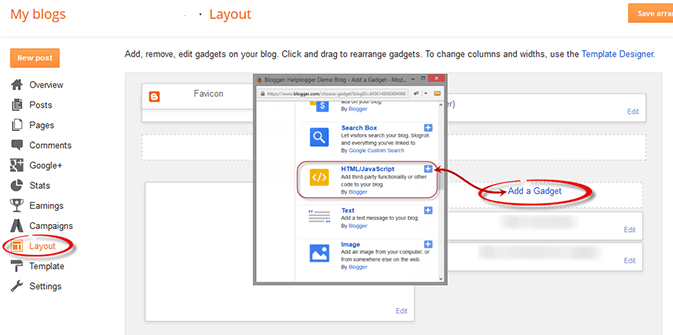
Step # 1: Login to your account and go to Layout > Add a Gadget > HTML/Javascript


Step # 2: copy the following code and paste in to the HTML/JavaScript box

1. Recent Posts Widget with Snippets

div id="hlrpsa"><script src="http://helplogger.googlecode.com/svn/trunk/recent-posts-with-snippets.js"></script><script>var numposts = 5;var showpostdate = false;var showpostsummary = true;var numchars = 100;var standardstyling = true;</script><script src="http://blog-address.com/feeds/posts/default?orderby=published&amp;alt=json-in-script&amp;callback=showrecentposts"></script></div><a style="font-size: 9px; color: #CECECE; float: right; margin: 5px;" href="
http://bloggerandmoney.blogspot.com/2015/03/simple-recent-posts-widget-for-blogger.html" rel="nofollow" >Recent Posts Widget</a><noscript>Your browser does not support JavaScript!</noscript><style type="text/css">#hlrpsa a {color: #0B3861; font-size: 13px;} #rpdr, #rpdr a {color:#808080;}#hlrpsa { color: #999999; font-size: 11px; border-bottom:1px #cccccc dotted; margin-top:-10px; padding-bottom:10px;}.hlrps a {font-weight:bold; }.hlrpssumm {}</style>

 2. Recent Posts Widget Showing only Posts titles

<div id="hlrpsb"><script style="text/javascript" src="http://helplogger.googlecode.com/svn/trunk/recent-posts-with-titles-only.js"></script><script style="text/javascript">var numposts = 10;var showpostdate = false;var showpostsummary = false;var numchars = 100;var standardstyling = true;</script><script src="http://blog-address.com/feeds/posts/default?orderby=published&alt=json-in-script&callback=showrecentposts"></script></div><a style="font-size: 9px; color: #CECECE; float: right; margin: 5px;" href="
http://bloggerandmoney.blogspot.com/2015/03/simple-recent-posts-widget-for-blogger.html" rel="nofollow" >Recent Posts Widget</a><noscript>Oops! Make sure JavaScript is enabled in your browser.</noscript><style type=text/css> #hlrpsb a {color: #0B3861; font-size: 13px;} #rpdr, #rpdr a {color:#808080;}.bbrecpost2 {padding-top:6px;padding-bottom:6px;border-bottom: 1px #cccccc dotted; }</style>
Step # 3: Customize according to your need

  • Replace 5 (in first code) and 10 (in secod code) with number of post that you want to display 
  • Replace fasle to ture if you should the posts date to display
  • Replace the http://blog-address.com text with your blog URL
  • Replace the color and size with color value in blue and violet (fornt-size) 
Now save the widget and enjoy.


Add Disqus Recent Comments Widget in Blogger

Today, we will discuss a simple but valuable tutorial how to Add Disqus Recent Comments widget in blogger. Gadgets like these let readers think about the discussions going ahead at your blog, and in case you're genuinely active, it adds a decent impression. This gadget being referred to is well-scripted and the JavaScript is facilitated at Disqus so as to reduce the load time in your blog.

Add Disqus Recent Comments Widget in Blogger

Step # 1: Login to your account and go to Layout > Add a Gadget > HTML/Javascript


Step # 2: Copy the following code and paste in tho the HTML/Javascript box

<div id="RecentComments" class="dsq-widget">
<script type="text/javascript" src="http://yourdomian.disqus.com/recent_comments_widget.js?num_items=5&hide_mods=0&hide_avatars=0&avatar_size=32&excerpt_length=50"></script>
</div>
Step # 3: Now you replace the text in bold with your own domain name (yourdomain.disqus.com).

Configuration

After the? in the URL, you can see a bunch of parameters. These are utilized to customize the usefulness of the gadget. Here is a concise depiction for each of them.

  • num_items - Number of comments to show in the gadget
  • hide_mods - Hide moderators' comments (1 for hidden, 0 for disabled)
  • hide_avatars - Hide display images (1 for hidden, 0 for shown)
  • avatar_size - Avatar size in pixels (32 by default)
  • excerpt_length - Character-length of the excerpt (1000 by default)

Styles


If you need, you can customize the looks of this gadget too. Here are some example CSS rules;
.dsq-widget ul.dsq-widget-list {
 padding: 0;
 margin: 0;
 text-align: left;
}
img.dsq-widget-avatar {
 width: 32px;
 height: 32px;
 border: 0px;
 margin: 0px;
 padding: 0px 3px 3px 0px;
 float: left;
}
p.dsq-widget-meta {
 clear: both;
 font-size: 80%;
 padding: 0;
 margin: 0;
}
li.dsq-widget-item {
 margin: 15px 0;
 list-style-type: none;
 clear: both;
}
span.dsq-widget-clout {
 padding: 0 2px;
 background-color: #ff7300;
 color: #fff;
}
a.dsq-widget-user {font-weight: bold;}
a.dsq-widget-thread {font-weight: bold;}
table.dsq-widget-horiz td {padding-right: 15px;}
.dsq-widget-comment p {display: inline;}
Done. Now enjoy this widget.  

Add free .tk domain in blogger with video New Method

A Domain name is important for any site because that that is your site links or name and people know your site with this name. If your site domain is very attractive then for the most people are again need to visit it, but if you use immense hard work with a sub domain and also produce amazing content then the users not give more value on your site, so that’s reason we need to got one domain for the blog. Many website provide free domain but in this article we learn How to add free .tk domain in blogger blog.

How to Add free .tk domain in blogger blog

To add free .tk domain in blogger just following these steps

Step # 1: Go to dot.tk website

Step # 2: Enter your desire domain and click on Go button 


Step # 3: If domain is available then you automatically jump on registration page. If not available your domain, then try another domain.

Step # 4: In registration form, enter here your blogger domain name. Click Use DNS and inter following IP address in the box. "216.239.32.21" and " 216.239.34.21". After inter IP address Select Registration length (12 month) and inter capture code and click signup. ( See in the screen shot)


Step # 5: Know website sent you confirm link in your e-mail address, you confirm it.

Step # 6: Now You successefully make your own .tk domian and next step is setup domian in blogger. 

Setup dot tk as blogger custom domian

After create a dot tk domain, we will going to setup in blogger. So , following these steps

Step # 1: Login to your blogger account and go to Setting > Basic > Add a custom domain

Step # 2: Enter your dot tk domain name with www and click Save button


Step # 3: When you click on Save you see error


Step # 4: Know you can go to your dot.tk account and click on Domian > My Domians


Step # 5: You can see new widow and click on Manage Domain


Step # 6: After click Manage Domain, A new widows open and you click on Manage Freenom DNS


Step # 7: Now open a new widow. firstly you can inter your dot tk domain in the Name boxs and click on Save Changes ( see the image)


Step # 8: After save changing successfully. Add a Record. Firstly click on More Records and you can see two boxs . inter your dot tk domian in Name boxs and inter the following IPs "216.239.36.21" and " 216.239.38.21" in the Target boxs. and Save Changes. (see the screen short)  


Step # 9: Now, Once again add a more Record. click on More Record Button. You can see two boxs.In the Name section and target, inter the following setting you can provide google. and select they type CName.( See the screen short)


Step # 10: Now ! Wait minimum 1 to 2 hours and maximum 24 hours required and after this login to your blogger account and got to Setting > Basic > Add a custom Domain and inter your tk domain and Click on Save. Blogger save your custom domain.


Add Rocket Back To Top Widget in Blogger

Hello everybody, Today we learn a beautiful and amazing blogger widget Add Rocket Back to Top Widget for blogger blog. It is so helpful for visitor and most important for every blog because through this your visitors can go easily back to top.


How to Add this 

Following these steps

Step # 1: Login to your account and go to Template > Edit HTML

Step # 2: Click Ctrl + F and search this </body> tag

Step # 3: Copy the following code and paste after </body> tag

<style>#rocketbacktotop{background: url(&#39;https://blogger.googleusercontent.com/img/b/R29vZ2xl/AVvXsEj-GT81e2Sp-34LsajxSQ03bhAsM3vjOKFcpTSmXLkBdwnHFe4HZa219heeu_4dMeQbTjtcWr4R5nT-8jgf8YSXB_fkhainq8wA_pfZC8IetNRhjJUiSE3lRCz5KmIo5T0sl0bAb8Ybvd8S/s1600/back-to-top-sprite-30224d9b.png&#39;) 0 0 no-repeat;height: 130px;width: 72px;padding:5px;position:fixed;bottom: 5px;right: 5px;cursor:pointer;    z-indez:1;}  #rocketbacktotop:hover{    background:url(https://blogger.googleusercontent.com/img/b/R29vZ2xl/AVvXsEj-GT81e2Sp-34LsajxSQ03bhAsM3vjOKFcpTSmXLkBdwnHFe4HZa219heeu_4dMeQbTjtcWr4R5nT-8jgf8YSXB_fkhainq8wA_pfZC8IetNRhjJUiSE3lRCz5KmIo5T0sl0bAb8Ybvd8S/s1600/back-to-top-sprite-30224d9b.png)no-repeat;background-position: 0 -142px;}</style><!-- Back to top button by Mourad Elktarni --><script src='http://ajax.googleapis.com/ajax/libs/jquery/1.10.0/jquery.min.js'/><script type='text/javascript'>//<![CDATA[$(window).scroll(function(){if($(this).scrollTop()>100){$("#rocketbacktotop").removeAttr("href");$("#rocketbacktotop").stop().animate({bottom:"0"},{duration:100,queue:false})}else{$("#rocketbacktotop").stop().animate({bottom:"30000"},{duration:8000,queue:false})}});$(function(){$("#rocketbacktotop").click(function(){$("html, body").animate({scrollTop:0},"slow");return false})});//]]></script><!-- Code provided to you by Allblogger.tips --><a href='#' id='rocketbacktotop'/>

Step # 4: Save template 

Done and enjoy.

Add New Stylish Facebook Comments Box in Blogger blog

Facebook has released many different plugins for blogs and websites. Presently Facebook developer's released "Facebook Comment Box". That is so amazing to making comments system on your blogger blog. With facebook comments box. Your bloggers visitors ready to comments on your blog posts and those post comments automatically share on their facebook comments wall.


How to Add New Stylish Facebook comments Box

To add this follow these instructions

Step # 1: Go to your blogger account and go to Template > Edit HTML

Step # 2: Click Ctrl + F and open search box and search the following code

<data:post.body/> 
Step # 3: Copy the following code and paste below of <data:post.body/>

<div id='fb-root'/>
    <script src='http://connect.facebook.net/en_US/all.js#xfbml=1'/>
     <fb:comments expr:href='data:post.url' num_posts='5' width='500'/> 
Step # 4: Replace 500 with your desired width box and replace 5 how much post you want to display

Step # 5: Save Template

Done!


Add 15 Stylish Search Box in Blogger blog

Today I discuss how to add stylish and beautiful search box for your blogger blog. I trust you'll adore. All search box made by using CSS3 and HTML. You can very easily customize as your own. Search box is not only making beauty in your blog template but it’s very helpful for visitors. So we should start.

How to Add Stylish Search box in Blogger blog


Following are the steps to add 

Step # 1: Login to your account and go to Layout > Add a Gadget > HTML/Javascript


Step # 2: Then choose one of the search box, copy search box code and paste into your HTML/Javascript box and Saved.

Search Box Codes:


 <style>#nbc-searchsimplebox1{padding:10px;}#nbc-searchsimplesubmit1{border:1px solid orange;background: orange;padding:5px;color:#ffffff;font:14px verdana;}#nbc-searchsimpleinput1{-moz-border-radius: 10px;-khtml-border-radius: 10px;-webkit-border-radius: 10px;border:1px solid #dcdcdc;background:#ffffff;padding:5px;color:#888888;font:14px verdana;}</style><div id='nbc-searchsimple1'>         <form expr:action='/search/max-results=8'  method='get' id="nbc-searchsimplebox1">            <input name='q' id='nbc-searchsimpleinput1' onblur='if (this.value == "") {this.value = "Search this site...";}' onfocus='if (this.value == "Search this site...") {this.value = ""}' type='text' value='Search this site...'/>            <input id='nbc-searchsimplesubmit1' type='submit' value='Search'/>         </form>      </div>


<style>
#nbc-searchexpandbox1
{
padding:10px;
}
#nbc-searchexpandsubmit1
{
border:1px solid #111111;
background: #111111;
padding:5px;
color:#ffffff;
font:14px verdana;
}
#nbc-searchexpandinput1
{
-moz-border-radius: 10px;
-khtml-border-radius: 10px;
-webkit-border-radius: 10px;
border:1px solid #dcdcdc;
background:#ffffff;
padding:5px;
color:#888888;
font:14px verdana;
transition: width 2s;
-webkit-transition: width 2s; /* Safari */
-o-transition: width 2s; /* Opera*/
-moz-transition: width 2s; /* firefox*/
width:65px;
}
#nbc-searchexpandinput1:hover
{
width:200px;
}
</style>
<div id='nbc-searchexpand1'>
         <form expr:action='/search/max-results=8'  method='get' id="nbc-searchexpandbox1">
            <input name='q' id='nbc-searchexpandinput1' onblur='if (this.value == "") {this.value = "Search this site...";}' onfocus='if (this.value == "Search this site...") {this.value = ""}' type='text' value='Search this site...'/>
            <input id='nbc-searchexpandsubmit1' type='submit' value='Search'/>
         </form>
      </div>

<style>
#nbc-searchgreen1
{
background: rgb(143,196,0); /* Old browsers */
background: -moz-linear-gradient(top,  rgba(143,196,0,1) 0%, rgba(143,196,0,1) 100%); /* FF3.6+ */
background: -webkit-gradient(linear, left top, left bottom, color-stop(0%,rgba(143,196,0,1)), color-stop(100%,rgba(143,196,0,1))); /* Chrome,Safari4+ */
background: -webkit-linear-gradient(top,  rgba(143,196,0,1) 0%,rgba(143,196,0,1) 100%); /* Chrome10+,Safari5.1+ */
background: -o-linear-gradient(top,  rgba(143,196,0,1) 0%,rgba(143,196,0,1) 100%); /* Opera 11.10+ */
background: -ms-linear-gradient(top,  rgba(143,196,0,1) 0%,rgba(143,196,0,1) 100%); /* IE10+ */
background: linear-gradient(to bottom,  rgba(143,196,0,1) 0%,rgba(143,196,0,1) 100%); /* W3C */
filter: progid:DXImageTransform.Microsoft.gradient( startColorstr='#8fc400', endColorstr='#8fc400',GradientType=0 ); /* IE6-9 */
border-radius:10px;
width:290px;
}
#nbc-searchgreenbox1
{
padding:10px;
}
#nbc-searchgreensubmit1
{
border:1px solid green;
background: green;
padding:5px;
color:#ffffff;
font:14px verdana;
}
#nbc-searchgreeninput1
{
-moz-border-radius: 10px;
-khtml-border-radius: 10px;
-webkit-border-radius: 10px;
border:1px solid #ffffff;
background:#ffffff;
padding:5px;
color:#888888;
font:14px verdana;
}
</style>
<div id='nbc-searchgreen1'>
         <form expr:action='/search/max-results=8'  method='get' id="nbc-searchgreenbox1">
            <input name='q' id='nbc-searchgreeninput1' onblur='if (this.value == "") {this.value = "Search this site...";}' onfocus='if (this.value == "Search this site...") {this.value = ""}' type='text' value='Search this site...'/>
            <input id='nbc-searchgreensubmit1' type='submit' value='Search'/>
         </form>
      </div>

<style>
#nbc-searchblue1
{
background: rgb(37,141,200); /* Old browsers */
background: -moz-linear-gradient(top,  rgba(37,141,200,1) 0%, rgba(37,141,200,1) 100%); /* FF3.6+ */
background: -webkit-gradient(linear, left top, left bottom, color-stop(0%,rgba(37,141,200,1)), color-stop(100%,rgba(37,141,200,1))); /* Chrome,Safari4+ */
background: -webkit-linear-gradient(top,  rgba(37,141,200,1) 0%,rgba(37,141,200,1) 100%); /* Chrome10+,Safari5.1+ */
background: -o-linear-gradient(top,  rgba(37,141,200,1) 0%,rgba(37,141,200,1) 100%); /* Opera 11.10+ */
background: -ms-linear-gradient(top,  rgba(37,141,200,1) 0%,rgba(37,141,200,1) 100%); /* IE10+ */
background: linear-gradient(to bottom,  rgba(37,141,200,1) 0%,rgba(37,141,200,1) 100%); /* W3C */
filter: progid:DXImageTransform.Microsoft.gradient( startColorstr='#258dc8', endColorstr='#258dc8',GradientType=0 ); /* IE6-9 */
border-radius:10px;
width:290px;
}
#nbc-searchbluebox1
{
padding:10px;
}
#nbc-searchbluesubmit1
{
border:1px solid orange;
background: orange;
padding:5px;
color:#ffffff;
font:14px verdana;
}
#nbc-searchblueinput1
{
-moz-border-radius: 10px;
-khtml-border-radius: 10px;
-webkit-border-radius: 10px;
border:1px solid #ffffff;
background:#ffffff;
padding:5px;
color:#888888;
font:14px verdana;
}
</style>
<div id='nbc-searchblue1'>
         <form expr:action='/search/max-results=8'  method='get' id="nbc-searchbluebox1">
            <input name='q' id='wc-searchblueinput1' onblur='if (this.value == "") {this.value = "Search this site...";}' onfocus='if (this.value == "Search this site...") {this.value = ""}' type='text' value='Search this site...'/>
            <input id='nbc-searchbluesubmit1' type='submit' value='Search'/>
         </form>
      </div>

<style>
#nbc-searchblack1
{
background: #222222;
border-radius:10px;
width:290px;
}
#nbc-searchblackbox1
{
padding:10px;
}
#nbc-searchblacksubmit1
{
border:1px solid #222222;
background: #dc4523;
padding:5px;
color:#ffffff;
font:14px verdana;
}
#nbc-searchblackinput1
{
-moz-border-radius: 10px;
-khtml-border-radius: 10px;
-webkit-border-radius: 10px;
border:1px solid #ffffff;
background:#ffffff;
padding:5px;
color:#888888;
font:14px verdana;
}
</style>
<div id='nbc-searchblack1'>
         <form expr:action='/search/max-results=8'  method='get' id="nbc-searchblackbox1">
            <input name='q' id='nbc-searchblackinput1' onblur='if (this.value == "") {this.value = "Search this site...";}' onfocus='if (this.value == "Search this site...") {this.value = ""}' type='text' value='Search this site...'/>
            <input id='nbc-searchblacksubmit1' type='submit' value='Search'/>
         </form>
      </div>

<style>
#MBBOldSearch {
display: block;
clear: both;
margin: 10px 0;
}
#MBBOldSearch #MBBSinput {
background: url("<a href="https://blogger.googleusercontent.com/img/b/R29vZ2xl/AVvXsEhcV2SrQcvlsV_-iI7xiLa9NyhAnm0LGaWyCjwe4nqcdO-6Mp0qSmk4bIPVdfVw9YwPpfgTlw3jyYLKjaHpiGTfOKTBOlH3oBUfhLTL1obxBT4qUwChD80ULhX9sgLSbnEdvlAw1wFXFyA/s1600/noxdo_blogspot_com_Search-icon.png&quot" onclick="javascript:_gaq.push(['_trackEvent','outbound-article','https://blogger.googleusercontent.com/img/b/R29vZ2xl/AVvXsEgq7Ylpu_T8bYAOod-0ZLhieexL1P1voB_KnUZZKEbjWp4zVeVMjSfKFVXQGcMRGpZ0poVngYQDrjDCutFgU-lOi4xnRmRhAD9AGHGvnNV8TKKqLLDfH72wlp98k1XYmdBs7XA3LiC3oG0/s1600/noxdo_blogspot_com_Search-icon1.png&quot']);" rel="nofollow">https://blogger.googleusercontent.com/img/b/R29vZ2xl/AVvXsEhAYZpVsukb_gJdyixWWkrBqlirYumh0_RWbdlhG5Nyz6oYcr84G8bAr-TXbEEGeQwSigLknqrQhILt23KgZb1LRFcSjw4qnWQ_iF0AoDcIRTnwuB1v_9Bh8vlzdTldpn1nZNX1wvd3J1Z9/s20/Search-icon.png&quot</a>;) no-repeat scroll 8px center transparent !important;
padding: 7px 15px 7px 35px !important;
color: #444;
font-weight: bold;
text-decoration: none;
border: 1px solid #D3D3D3 !important;
-webkit-border-radius: 4px;
-moz-border-radius: 4px;
border-radius: 4px;
-webkit-box-shadow: 1px 1px 2px #CCC inset;
-moz-box-shadow: 1px 1px 2px #CCC inset;
box-shadow: 1px 1px 2px #CCC inset;
width: 52%;
}
#MBBOldSearch #MBBSsubmit {
color: #444;
font-weight: bold;
text-decoration: none;
padding: 6px 15px;
border: 1px solid #D3D3D3;
cursor: pointer;
-webkit-border-radius: 4px;
-moz-border-radius: 4px;
border-radius: 4px;
background: #fbfbfb;
background: -moz-linear-gradient(top, #fbfbfb 0%, #f4f4f4 100%);
background: -webkit-gradient(linear, left top, left bottom, color-stop(0%,#fbfbfb), color-stop(100%,#f4f4f4));
background: -webkit-linear-gradient(top, #fbfbfb 0%,#f4f4f4 100%);
background: -o-linear-gradient(top, #fbfbfb 0%,#f4f4f4 100%);
background: -ms-linear-gradient(top, #fbfbfb 0%,#f4f4f4 100%);
filter: progid:DXImageTransform.Microsoft.gradient( startColorstr='#FBFBFB', endColorstr='#F4F4F4',GradientType=0 );
background: linear-gradient(top, #fbfbfb 0%,#f4f4f4 100%);
}
</style>
 <div id="MBBOldSearch">
    <form action="/search/max-results=8">
        <input name="q" id="MBBSinput" type="text" />
        <input value="Search" id="MBBSsubmit" type="submit" />
    </form>
</div>


<style type='text/css'>
/*<![CDATA[*/
#sbutton {
background: -moz-linear-gradient(center top , #4D90FE 0%, #4787ED 100%) repeat scroll 0pt 0pt transparent;background: -webkit-gradient(linear, left top, left bottom, color-stop(0%,#4d90fe), color-stop(100%,#4787ed));
background: -webkit-linear-gradient(top, #4d90fe 0%,#4787ed 100%);
background: -o-linear-gradient(top, #4d90fe 0%,#4787ed 100%);
background: -ms-linear-gradient(top, #4d90fe 0%,#4787ed 100%);
background: linear-gradient(top, #4d90fe 0%,#4787ed 100%);background-color: #4d90fe;
border: 1px solid #3079ED;
border-radius: 2px 2px 2px 2px;
color: #FFFFFF;
height: 27px;
min-width: 76px;
padding: 0 21px;padding-bottom: 2px;
}
#sbutton:hover{    background-color: #357AE8;
background-image: -moz-linear-gradient(center top , #4D90FE, #357AE8);background: -webkit-gradient(linear, left top, left bottom, color-stop(0%,#4d90fe), color-stop(100%,#357ae8));
background: -webkit-linear-gradient(top, #4d90fe 0%,#357ae8 100%);
background: -o-linear-gradient(top, #4d90fe 0%,#357ae8 100%);
background: -ms-linear-gradient(top, #4d90fe 0%,#357ae8 100%);
background: linear-gradient(top, #4d90fe 0%,#357ae8 100%);
border: 1px solid #2F5BB7;
box-shadow: 0 1px 1px rgba(0, 0, 0, 0.1);}
#simg {
background: url("<a href="https://blogger.googleusercontent.com/img/b/R29vZ2xl/AVvXsEjniTBm-rEE_Vt2rZ9AF1uBPf_EvKmrkuIbPg0IEGQXEJuK69q_NkQ98tnBIkQygUI4AaI0DKYh_klxSv0ZdXU0dG2mzmLRM_T9IGhYYXFuqUvf6IvZwioRHeKyLJITikzBtSFzTSffUS4/s1600/noxdo_blogspot_com_Search-icon2.png&quot" onclick="javascript:_gaq.push(['_trackEvent','outbound-article','https://blogger.googleusercontent.com/img/b/R29vZ2xl/AVvXsEjniTBm-rEE_Vt2rZ9AF1uBPf_EvKmrkuIbPg0IEGQXEJuK69q_NkQ98tnBIkQygUI4AaI0DKYh_klxSv0ZdXU0dG2mzmLRM_T9IGhYYXFuqUvf6IvZwioRHeKyLJITikzBtSFzTSffUS4/s1600/noxdo_blogspot_com_Search-icon2.png&quot']);" rel="nofollow">https://blogger.googleusercontent.com/img/b/R29vZ2xl/AVvXsEgj_QWaOF6KgWf8NiAia8NvUiaxR-vDPjlCiGgtkGbIvIYUE2dX151yCJqtX47Nk9Z63ppnac5-rYsyu1UtX51CpqVoLt2aucGrfIiS9cWYWciVdbfDIiLeySbl2KGb2QeGTsRdwdi2pCJB/s1600/searchicon.png&quot</a>;) no-repeat scroll 0 0 transparent;
display: inline-block;
height: 14px;
margin: 0;
width: 17px;z-index:101;
}#s:hover {box-shadow: 0 1px 2px #C1C1C1 inset;}
#s {border: 1px solid #BCBCBC;border-radius: 4px 4px 4px 4px;font: italic 14px times New Roman;padding: 4px 2px;width: 146px; -moz-transition: width 0.2s ease-in 0s; -webkit-transition: width 0.2s ease-in; -o-transition: width 0.2s ease-in;}
#s:focus {width: 200px;}
.noop-searchbox {
display: block;
position: fixed;
right: 12px;
top: 1%;
max-width: 300px;min-width: 238px;
z-index: 100;
}
/*]]>*/
</style>
<div class='noop-searchbox' id='noop-searchbox'>
<form action='/search/max-results=8' id='noop-searchform' method='get'>
<input id='s' name='q' onblur='if (this.value == "") {this.value = "Search...";}' onfocus='if (this.value == "Search...") {this.value = ""}' type='text' value='Search...'/>
<button id='sbutton' type='submit'><span id='simg'></span></button>
</form></div>

<style>
#search-form {
background: #e1e1e1; /* Fallback color for non-css3 browsers */
width: 365px;
background: -webkit-gradient( linear,left top, left bottom, color-stop(0, rgb(243,243,243)), color-stop(1, rgb(225,225,225)));
background: -moz-linear-gradient( center top, rgb(243,243,243) 0%, rgb(225,225,225) 100%);
border-radius: 17px; -webkit-border-radius: 17px; -moz-border-radius: 17px;
box-shadow: 1px 1px 2px rgba(0,0,0,.3), 0 0 2px rgba(0,0,0,.3);
-webkit-box-shadow: 1px 1px 2px rgba(0,0,0,.3), 0 0 2px rgba(0,0,0,.3);
-moz-box-shadow: 1px 1px 2px rgba(0,0,0,.3), 0 0 2px rgba(0,0,0,.3); }
input[type="text"]{
background: #fafafa;
background: -webkit-gradient( linear, left bottom, left top, color-stop(0, rgb(250,250,250)), color-stop(1, rgb(230,230,230)));
background: -moz-linear-gradient( center top, rgb(250,250,250) 0%, rgb(230,230,230) 100%);
border: 0; border-bottom: 1px solid #fff;
border-right: 1px solid rgba(255,255,255,.8);
font-size: 16px; margin: 4px; padding: 5px; width: 250px;
border-radius: 17px; -webkit-border-radius: 17px; -moz-border-radius: 17px;
box-shadow: -1px -1px 2px rgba(0,0,0,.3), 0 0 1px rgba(0,0,0,.2);
-webkit-box-shadow: -1px -1px 2px rgba(0,0,0,.3), 0 0 1px rgba(0,0,0,.2);
-moz-box-shadow: -1px -1px 2px rgba(0,0,0,.3), 0 0 1px rgba(0,0,0,.2); }
input[type="text"]:focus{outline: none; background: #fff;
background: -webkit-gradient( linear, left bottom, left top, color-stop(0, rgb(255,255,255)), color-stop(1, rgb(235,235,235)));
background: -moz-linear-gradient( center top, rgb(255,255,255) 0%, rgb(235,235,235) 100%); }
input[type="submit"]{
background: #44921f;
background: -webkit-gradient( linear, left top, left bottom, color-stop(0, rgb(79,188,32)), color-stop(0.15, rgb(73,157,34)), color-stop(0.88, rgb(62,135,28)), color-stop(1, rgb(49,114,21)));
background: -moz-linear-gradient( center top, rgb(79,188,32) 0%, rgb(73,157,34) 15%, rgb(62,135,28) 88%, rgb(49,114,21) 100%);
border: 0; color: #eee; cursor: pointer;
float: right; font: 16px Arial, Helvetica, sans-serif; font-weight: bold; height: 30px;
margin: 4px 4px 0; text-shadow: 0 -1px 0 rgba(0,0,0,.3); width: 84px; outline: none;
border-radius: 30px; -webkit-border-radius: 30px; -moz-border-radius: 30px;
box-shadow: -1px -1px 1px rgba(255,255,255,.5), 1px 1px 0 rgba(0,0,0,.4);
-moz-box-shadow: -1px -1px 1px rgba(255,255,255,.5), 1px 1px 0 rgba(0,0,0,.2);
-webkit-box-shadow: -1px -1px 1px rgba(255,255,255,.5), 1px 1px 0 rgba(0,0,0,.4); }
input[type="submit"]:hover {
background: #4ea923;background: -webkit-gradient( linear, left top, left bottom, color-stop(0, rgb(89,222,27)), color-stop(0.15, rgb(83,179,38)), color-stop(0.8, rgb(66,143,27)), color-stop(1, rgb(54,120,22)));
background: -moz-linear-gradient( center top, rgb(89,222,27) 0%, rgb(83,179,38) 15%, rgb(66,143,27) 80%, rgb(54,120,22) 100%); }
input[type="submit"]:active {
background: #4ea923;background: -webkit-gradient( linear, left bottom, left top, color-stop(0, rgb(89,222,27)), color-stop(0.15, rgb(83,179,38)), color-stop(0.8, rgb(66,143,27)), color-stop(1, rgb(54,120,22))); background: -moz-linear-gradient( center bottom, rgb(89,222,27) 0%, rgb(83,179,38) 15%, rgb(66,143,27) 80%, rgb(54,120,22) 100%); }
</style>
<form action="/search/max-results=8" id="searchbox">
<input name="cx" type="hidden" value="X:Y" />
<input name="cof" type="hidden" value="FORID:11" />
<input id="q" name="q" size="70" type="text" />
<input name="sa" type="submit" value="Search" />
</form>


<style type="text/css">
#nbc-searchbox{background:url(https://blogger.googleusercontent.com/img/b/R29vZ2xl/AVvXsEgaaVlGmQs_9sv6Yo59i49zF9XmUrimPpIG2fMvfIoC7xR3_m8LFEwA3AfQPcfM6px8Kh-jFUrXxUBLODZpdngqwmmiVvfGqYWQo1rS4a3Y37ZvUz2yudQmprl4-2AWapoFrFSQfF1pBLc/s1600/noxdo_blogspot_com_Search-icon3.png) no-repeat scroll center center transparent;width:307px;height:50px;disaply:block;}
form#nbc-searchform{display: block;padding: 10px 12px;margin:0;}
form#nbc-searchform #s{padding: 6px;margin:0;width: 235px;font-size:14px;vertical-align: top;border:none;background:transparent;}
form#nbc-searchform #sbutton{margin:0;padding:0;height:30px;width:30px;vertical-align: top;border:none;background:transparent;}
</style>
<div id="nbc-searchbox">
<form id="nbc-searchform" action="/search/max-results=8" method="get">
    <input type="text" id="s" name="q" value="Search..." onfocus='if (this.value == "Search...") {this.value = ""}' onblur='if (this.value == "") {this.value = "Search...";}'/>
</form>
</div>

<style type="text/css">
#nbc-searchbox{background:url(https://blogger.googleusercontent.com/img/b/R29vZ2xl/AVvXsEgoBGO6gbCes399JYdbrK9HRvNqiOy-opcypqjAqWEtOD5v_ad-sAgkFh2vBF8_5KAChJACQx1l4APyKBiNLpN9kh5ix1fIpzt3uN8BV-EguXGEN_Cs68vCT5a8eIlF8z1rv_7xKsG2pMY/s1600/noxdo_blogspot_com_Search-icon4.png) no-repeat scroll center center transparent;width:307px;height:50px;disaply:block;}
form#nbc-searchform{display: block;padding: 12px;margin:0;}
form#nbc-searchform #s{padding: 6px 6px 6px 26px;margin:0;width: 215px;font-size:14px;vertical-align: top;border:none;background:transparent;}
form#nbc-searchform #sbutton{margin:0;padding:0;height:30px;width:30px;vertical-align: top;border:none;background:transparent;}
</style>
<div id="nbc-searchbox">
<form id="nbc-searchform" action="/search/max-results=8" method="get">
    <input type="text" id="s" name="q" value=""/>
</form>
</div>

<style type="text/css">
#nbc-searchbox{background:url(https://blogger.googleusercontent.com/img/b/R29vZ2xl/AVvXsEgWUC7Z0uSLxnmxmyQU92urCbq8cS_NRrgUIZuUEWy8mkpTGGMF3wOYb0ZMIp-dMFv-fQKaJ6o195PwSZ-Wb76oZbhCg3OFjVSTaMf9kEGLMDO9-ij2K1lRg_V6yQ663B_iU-ktP_gawbQ/s1600/noxdo_blogspot_com_Search-icon5.png) no-repeat scroll center center transparent;width:307px;height:50px;disaply:block;}
form#nbc-searchform{display: block;padding: 12px;margin:0;}
form#nbc-searchform #s{padding: 6px 6px 6px 26px;margin:0;width: 215px;font-size:14px;vertical-align: top;border:none;background:transparent;}
form#nbc-searchform #sbutton{margin:0;padding:0;height:30px;width:30px;vertical-align: top;border:none;background:transparent;}
</style>
<div id="nbc-searchbox">
<form id="nbc-searchform" action="/search/max-results=8" method="get">
    <input type="text" id="s" name="q" value=""/>
</form>
</div>

<style type="text/css">
#nbc-searchbox{background:url(https://blogger.googleusercontent.com/img/b/R29vZ2xl/AVvXsEjFBhs-3k6UeYRW8S2j8ORo9j97e75PUblyE4oA-GY7rutq4Wb6fOjPoRBUPeMSyBfnOE9npB73VqmPoUn2oe_YIvuMhHQ7zzfGEJowtyM3MpaiM5kMwwSralgSa2CS5-V26UnyV0lnVzY/s1600/noxdo_blogspot_com_Search-icon6.png) no-repeat scroll center center transparent;width:307px;height:50px;disaply:block;}
form#nbc-searchform{display: block;padding: 10px 12px;margin:0;}
form#nbc-searchform #s{padding: 6px;margin:0;width: 235px;font-size:14px;vertical-align: top;border:none;background:transparent;}
form#nbc-searchform #sbutton{margin:0;padding:0;height:30px;width:30px;vertical-align: top;border:none;background:transparent;}
</style>
<div id="nbc-searchbox">
<form id="nbc-searchform" action="/search/max-results=8" method="get">
    <input type="text" id="s" name="q" value="Search..." onfocus='if (this.value == "Search...") {this.value = ""}' onblur='if (this.value == "") {this.value = "Search...";}'/>
</form>
</div>

style>
#searchbox {
    background: url(https://blogger.googleusercontent.com/img/b/R29vZ2xl/AVvXsEhDNWJYxFBRHRUrEESRwAN9ByV-EVq270W_QRH0I3mfC8BUvXmIBuSe7wSqyzcOztdHZDPy7m-g5i2TNaXK6mgB1wyxvxMhtKaDBFCCHn1Jjo6vy6O0lCmd2p5iTA8zWM4eZyZ0poD29j84/s1600/searchbar.png) no-repeat;
    width: 208px;
    height: 29px;
}
input:focus::-webkit-input-placeholder {
    color: transparent;
}
input:focus:-moz-placeholder {
    color: transparent;
}
input:focus::-moz-placeholder {
    color: transparent;
}
#searchbox input {
    outline: none;
}
#searchbox input[type="text"] {
    background: transparent;
    margin: 3px 0px 0px 20px;
    padding: 5px 0px 5px 0px;
    border-width: 0px;
    font-family: "Arial Narrow", Arial, sans-serif;
    font-size: 12px;
    color: #828282;
    width: 70%;
    display: inline-table;
    vertical-align: top;
}
#button-submit {
    background: url(https://blogger.googleusercontent.com/img/b/R29vZ2xl/AVvXsEjXWgx_T4HPiu2BsE5IO6os2CGvRyqZ7DfX-x0D8_89J8LDz3Wa3a_qm4b7Tvcfeq_JHxbFax2T07JUuL-D5IfA79yyY4FVoI6qu610PYYUqLKUgSg4m0AJEKg1L8IF-SeILF6m8SKU7SJ9/s1600/magnifier.png) no-repeat;
    border-width: 0px;
    cursor: pointer;
    margin-left: 10px;
    margin-top: 4px;
    width: 21px;
    height: 22px;
}
#button-submit:hover {
    background: url(https://blogger.googleusercontent.com/img/b/R29vZ2xl/AVvXsEhmFv7_C4V6Nh4t7XvS8L03-NEUutGdAXW-SO5fVgyv8uah2TgbGrWBsWyW0Bb_r8uFKI0jEQHdaReyl3XhRjYk70yv3CXjgOnk4AWDvBQOHRnPKhklusmlqmLMnkwfXbSvn7FB3brQ44Ol/s1600/magnifier-hover.png) no-repeat;
}
#button-submit:active {
    background: url(https://blogger.googleusercontent.com/img/b/R29vZ2xl/AVvXsEhmFv7_C4V6Nh4t7XvS8L03-NEUutGdAXW-SO5fVgyv8uah2TgbGrWBsWyW0Bb_r8uFKI0jEQHdaReyl3XhRjYk70yv3CXjgOnk4AWDvBQOHRnPKhklusmlqmLMnkwfXbSvn7FB3brQ44Ol/s1600/magnifier-hover.png) no-repeat;
    outline: none;
}
#button-submit::-moz-focus-inner {
    border: 0;
}
</style>
<form id="searchbox" method="get" action="/search" autocomplete="off">
    <input name="q" type="text" size="15" placeholder="search..." />
    <input id="button-submit" type="submit" value="" />
</form>

<style>
#searchbox {
    background: url(https://blogger.googleusercontent.com/img/b/R29vZ2xl/AVvXsEiG13dBJNkIbBrmXcO3upQQijmMhkOxW-39LGoPuPbuecPUyflOOlbRgmuxYK-5K7Ok1KFEC774bDSfCAZCHBmmrVuY2S-tbFZO_pWJuXlpTcJAO1NZS0awAgTn9DNlNUw2Ee9vkwgkpN5X/s1600/search-box1.png) no-repeat;
    width: 250px;
    height: 65px;
}
input:focus::-webkit-input-placeholder {
color: transparent;
}
input:focus:-moz-placeholder {
color: transparent;
}
input:focus::-moz-placeholder {
color: transparent;
}
#searchbox input {
    outline: none;
}
#searchbox input[type="text"] {
    background: transparent;
    padding: 5px 0px 5px 20px;
    margin: 10px 15px 0px 0px;
    border-width: 0px;
    font-family: "Brush Script MT", cursive;
    font-size: 12px;
    color: #595959;
    width: 65%;
    font-weight: bold;
    display: inline-table;
    vertical-align: top;
}
#button-submit {
    background: url(https://blogger.googleusercontent.com/img/b/R29vZ2xl/AVvXsEiHsPY6y-iJEixGJJ0xm-txUKv5HPNGVu8IYMsRDKJa11qbqDYy-2CysaS-dO1WgeHUwIt4-v1AC_8PTU8jdJ6b966kpKz2b8mdp1BMsRiN1aWERNisL9DWManp77Rkh8J8KNU83j00vBwx/s1600/magnifier.png) no-repeat;
    border-width: 0px;
    cursor: pointer;
    margin-top: 10px;
    width: 19px;
    height: 25px;
}
#button-submit:hover {
    background: url(https://blogger.googleusercontent.com/img/b/R29vZ2xl/AVvXsEhV6A0RQ20ABIcPEmXh0KKoslUzHp-BNEROl7QTSfXtJJUlUaoj5ky17RLe_Rdxk6UibQufJjURNf8zRCmrY_RXEKsITwT87-Al2lIJp1VODRRT6ByGHab9DD77phmIgXYlShkqKM5hn0jm/s1600/magnifier-hover.png) no-repeat;
}
#button-submit:active {
    background: url(https://blogger.googleusercontent.com/img/b/R29vZ2xl/AVvXsEhV6A0RQ20ABIcPEmXh0KKoslUzHp-BNEROl7QTSfXtJJUlUaoj5ky17RLe_Rdxk6UibQufJjURNf8zRCmrY_RXEKsITwT87-Al2lIJp1VODRRT6ByGHab9DD77phmIgXYlShkqKM5hn0jm/s1600/magnifier-hover.png) no-repeat;
    outline: none;
}
#button-submit::-moz-focus-inner {
    border: 0;
}
</style>
<form id="searchbox" method="get" action="/search" autocomplete="off">
    <input class="textarea" name="q" type="text" size="15" placeholder="Search here..." />
    <input id="button-submit" type="submit" value="" />
</form>

<style>
#searchbox {
width: 280px;
background: url(https://blogger.googleusercontent.com/img/b/R29vZ2xl/AVvXsEhKYDouOlMM27SIZ3sFf2jMRH4S1at0hZD7cOn-JlvTAcECXq6dP-T9voCAEy-mZi3RguYBbIdXFC4xfFyoGzApwXs_SxcsSFYe95zuRUlqimGG7zpJShQfamlgginnEW63ZO4GHbeSEzVL/s1600/search-box.png) no-repeat;
}
#searchbox input {
    outline: none;
}
input:focus::-webkit-input-placeholder {
    color: transparent;
}
input:focus:-moz-placeholder {
    color: transparent;
}
input:focus::-moz-placeholder {
    color: transparent;
}
#searchbox input[type="text"] {
background: transparent;
border: 0px;
font-family: "Avant Garde", Avantgarde, "Century Gothic", CenturyGothic, "AppleGothic", sans-serif;
font-size: 14px;
    color: #f2f2f2 !important;
    padding: 10px 35px 10px 20px;
    width: 220px;
}
#searchbox input[type="text"]:focus {
color: #fff;
}
#button-submit{
background: url(https://blogger.googleusercontent.com/img/b/R29vZ2xl/AVvXsEgYEQsI-UF8A12cHQncoPsBviubNq6YIYTbDmMaBeL4OO_cESdYdsaEtss02KhQe9eHgmiLOEZ_yLGgAwm7huTegUAuzdXVuVPemadqgBUx4ipfUWsl_4OqkxvLNiZFpNEd7tBdDhEZ7S52/s1600/search-icon.png) no-repeat;
margin-left: -40px;
border-width: 0px;
width: 40px;
height: 50px;
}
#button-submit:hover {
background: url(https://blogger.googleusercontent.com/img/b/R29vZ2xl/AVvXsEi5N-4hNan3KrbmqhriQophiWiIsMqNOiE31XRmK8F7XM5BNArivcFRX_X1ZypZFc0s9NHeiDcId-uNYFeE5Mfm8GJqkO9Pb6DHmkU8xpD6NiHck33vCHaCRQ5wYsT_i95b7q5yVci5qj_t/s1600/search-icon-hover.png);
}
</style>
<form id="searchbox" method="get" action="/search" autocomplete="off">
<input name="q" type="text" size="15" placeholder="Enter keywords here..." />
<input id="button-submit" type="submit" value=" "/>
</form>

I hope this post become useful for you.